


Local News - Breaking &Weather
4.081.00 Reviews
App Specs
- Version
- 1.4.02
- Updated On
- License
- Free
- Downloads
- 100,000+
- Developer
- Daowei Network
- Categories
- News & Magazines
- Platform
- Android
Screenshots

 Analysis by AppCompare
I like the idea behind Local News - Breaking & Weather: put nearby headlines and weather information in one place, so checking what is happening does not become a small research project. That combination is useful when I am planning a commute, keeping an eye on a developing local story, or deciding whether an outdoor plan still makes sense. My overall take is positive but measured: the app has a practical focus, though it works best as a convenient extra source rather than the only place I turn for urgent or detailed information.
A quick check that can shape the day
The most appealing part of this kind of local news app is the way it brings two everyday questions together: what is happening nearby, and what might the weather do next? Instead of jumping between a general news app and a separate forecast tool, I can use one starting point to get oriented. That does not make every story or forecast complete, but it can make a morning check quicker and help me decide what deserves a closer look.
Local News - Breaking & Weather is a free news and magazines app from Daowei Network. It has a 3.5 average from around 150 ratings, and more than 100,000 installs. It is rated Everyone, runs on Android 7.0 or later, and its current version is 1.2.30. The app is free to download, with optional in-app purchases ranging from $1.99 to $14.99 per item. Those purchases are worth keeping in mind if you prefer apps with no paid extras at all.
All About Staying Informed
The app is designed to be a handy place to check nearby headlines and weather details. I find that pairing more useful than it may sound: a local road closure, community event, or storm can affect the same plans, so seeing news and conditions in one routine helps me make a more informed call. The app is best approached as a quick overview, with a deeper source available when a story needs confirmation or more context.
Breaking news: useful, but keep perspective
Breaking news alerts can be helpful when a local development affects the day, especially if I am away from home and would not otherwise hear about it promptly. They can also interrupt at inconvenient moments, so I would treat alert settings as something to tune rather than leaving every notification on by default. A focused selection is more likely to be useful than a steady stream of updates that compete with work or family time.
For an important incident, I would use an alert as a prompt to check the details, not as the whole story. Early reports can change as more information becomes available, and a short notification cannot explain every caveat. If the news affects safety, travel, or a time-sensitive decision, I would compare it with an official local source before acting. That habit is sensible with any breaking-news app, and it keeps speed from being mistaken for completeness.
Weather and radar for practical decisions
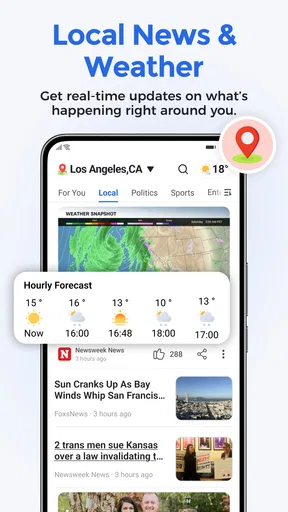
The weather side is particularly handy when a forecast needs to inform a real plan rather than satisfy curiosity. I can check conditions before leaving, look at the hourly outlook when timing matters, and use radar to get a visual sense of approaching weather. A radar view can make a changing situation easier to understand at a glance, although it should not replace local warnings or common-sense precautions when conditions become dangerous.
Worth Reading Before You Choose

Flipboard Shows What News Apps Must Do Beyond the Feed

Switching to Android Auto Means Rethinking Your Driving Routine

Google Calendar Makes a Crowded Week Easier to Manage

Ludo King Makes the Most of the Minutes Between Plans

Baby Panda World Brings Quick Play to Modern Phones, but Its Game Library Feels Busy

ESPN’s Live Game View Makes Following Close Games Easier
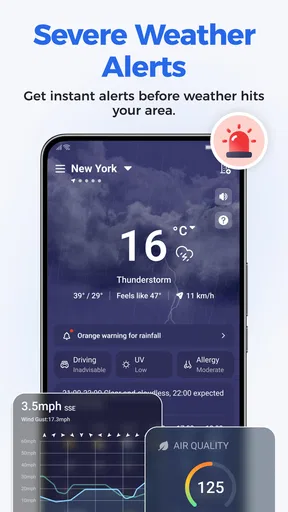
Location-based severe-weather alerts can be valuable when plans may need to change. I would still make sure the relevant location is selected and keep another reliable way to receive urgent warnings, especially when travelling or staying somewhere unfamiliar. A forecast is a planning aid, not a promise: conditions can shift, and a single app should not be the only input for decisions about safety.
Making the feed work for you
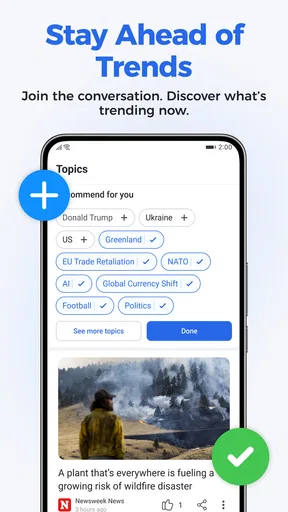
Choosing the subjects that interest you can make the news feed feel less like a general stream and more like a useful daily scan. I would start with the topics I genuinely follow, then adjust after a few days if the mix feels too broad or too narrow. This is a small but worthwhile habit: a more relevant feed saves time, while a little variety can stop important local context from disappearing behind one favorite subject.
The clean layout and straightforward navigation are a good fit for quick checks. Still, ease of use does not remove the need to judge what a headline leaves out. When a topic matters to me, I would open the full story and look for a second source rather than relying on a notification or a brief summary. That approach is especially useful for complex local issues, where the details may matter more than the headline.
Where it fits among other news apps
After spending time with the app, I see its strongest case as convenience: local news and weather live in the same place, and adjustable topics help keep the experience relevant. That makes it a reasonable companion to a broad national news app, which may offer more depth on major stories but can give less attention to a neighborhood-level update. A dedicated weather app may also be a better choice for someone who wants more specialized forecasting tools or relies on a particular provider.
There is a trade-off in choosing an all-in-one approach. One app can reduce the effort of checking several sources, but it may not be the best at every individual job. I also noticed that loading could feel slower when moving between sections. If I need a fast answer in a hurry, that pause is frustrating; if I am simply browsing, it is less of a problem. I would not choose this app solely for speed or as a replacement for specialist services.
Who will get the most from it
I would recommend it to someone who wants a simple local check-in and likes having headlines and weather together. It may suit a commuter who checks the forecast before leaving, a parent planning an outdoor afternoon, or a resident who wants to keep an eye on nearby developments without building a complicated news routine. A realistic use is to scan the local feed over breakfast, check the hourly outlook before heading out, and revisit radar if the sky changes later.
It is less suited to readers who want exhaustive reporting, extensive source comparisons, or a highly specialized weather workstation. People who dislike notifications may also prefer to keep alerts limited or rely on a quieter routine of opening the app when convenient. I would skip it as a sole emergency-information channel, too: use official alerts and local authorities for critical instructions, and treat the app as one useful layer rather than the final authority.
A few practical habits make a difference
To get more value from the app, I would separate routine browsing from urgent checking. Use the feed for a quick sense of what is happening, but follow a consequential story through to fuller coverage. For weather, look at the hourly forecast when scheduling something specific and use radar to understand movement, then check official warnings if the conditions could affect safety. These steps do not require extra effort every time; they matter most when the decision has real consequences.
I would also review the topic choices and notification preferences after using the app for a little while. If alerts feel noisy, narrowing them is more useful than disabling everything and missing a genuinely relevant update. If the feed feels thin for a particular subject, a specialist publication can fill that gap. The app’s role is not to make every other source unnecessary; it is to make the first check more convenient.
What to expect before installing
The basic appeal is easy to understand, but a few expectations are worth setting. This is a free app with optional purchases, so anyone who wants to avoid spending should pay attention to any purchase prompts and decide whether the free experience meets their needs. The Everyone age rating also makes it broadly suitable from a content-rating standpoint, though individual news topics can naturally vary in seriousness.
It is available for devices running Android 7.0 or later, which is useful to know before downloading on an older phone. The release date is February 12, 2026. I would check that the device meets the minimum requirement and leave enough patience for section changes if I am using a slower connection or older hardware; the loading delay I encountered is the main practical annoyance in an otherwise straightforward routine.
For anyone wondering whether it replaces a weather app or a major news source, my answer is no—not completely. It is better understood as a convenient local dashboard that can point you toward what deserves attention. If your priority is a single, quick glance at community headlines and changing weather, that is a useful role. If accuracy at the most detailed level, deep reporting, or emergency guidance is the priority, pair it with sources built specifically for those needs.
My verdict
If you're anything like me, staying updated with local happenings is a must, especially when it involves breaking news and weather updates. Recently, I got my hands on the Local News - Breaking & Weather app, and let me tell you, it's quite the tool for keeping your finger on the pulse of your community. Let's dive into what makes this app tick and why it might just be your next download.
Bringing news and weather together
The app is designed to be your one-stop shop for everything happening around you. From the latest headlines to detailed weather forecasts, this app makes sure you’re never out of the loop. As someone who's always on the go, I found this feature particularly handy. A quick glance, and I knew exactly what was happening in my neck of the woods.
Breaking News at Your Fingertips
One of the standout features of the app is its breaking news alerts. You know how it is—we’re all consumed by our daily routines, and sometimes, we miss out on important updates. With this app, those days are over. As soon as a story breaks, you get an alert. It’s like having your very own newsroom in your pocket!
I was pleasantly surprised by how timely these alerts were. Whether it was a major event or a local incident, the app ensured I was notified promptly. This is especially crucial in times of emergencies when every second counts.
Weather Updates Like Never Before
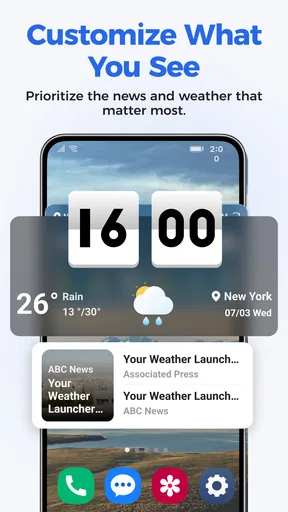
Living in an area where the weather can change in the blink of an eye, having accurate and up-to-date forecasts is essential. The app delivers detailed weather information, right down to hourly forecasts. I found the radar feature particularly impressive, allowing me to visualize upcoming weather patterns.
What sets this app apart is its personalized weather alerts. Based on your location, it gives you a heads-up about severe weather conditions, so you’re never caught off guard. I remember a particularly stormy evening when the app alerted me about a severe thunderstorm, giving me enough time to take the necessary precautions. Talk about reliable!
Customizing Your News Experience
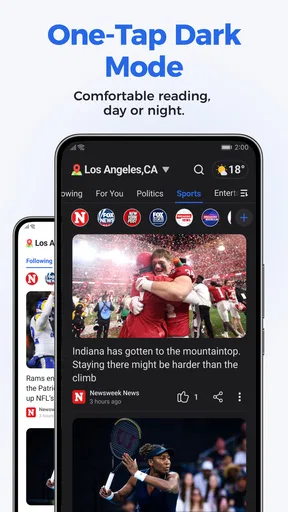
This app doesn’t just throw random news at you. It’s customizable to your interests, which I found extremely beneficial. You can choose the types of news you want to see, be it sports, politics, or entertainment. This feature ensures that the content you receive is relevant to your interests, making your news experience much more enjoyable.
The user interface is quite intuitive, making it easy to navigate through different sections. Even if you're not tech-savvy, you'll find this app simple to use. The design is sleek, with a clean layout that doesn’t overwhelm you with too much information at once.
How Does It Stack Up?
After spending some time with the app, I can confidently say it does an admirable job of keeping you informed. The combination of breaking news and weather updates is a powerful one, and it’s executed well here. The alerts are timely, the content is relevant, and the customization options make it personal to you.
However, no app is perfect. I did notice that sometimes the app took a bit longer to load than I’d like, especially when switching between sections. But, considering the wealth of information it provides, this is a minor hiccup I can overlook.
In a world where information is power, having a reliable source like the app at your fingertips is invaluable. It’s more than just an app; it’s a tool to keep you connected and prepared, no matter what the day throws your way. So, if you’re looking to stay ahead of the curve, give it a try. You might just find it’s exactly what you’ve been missing.
Pros
- Timely updates on local news.
- Customizable news alerts.
- Intuitive and user-friendly interface.
- Comprehensive weather forecasts.
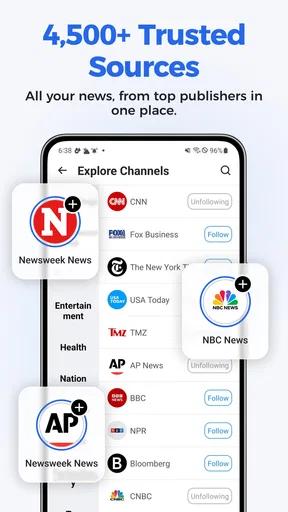
- Wide range of news categories.
Cons
- Occasional in-app ads.
- Requires internet connection.
- Limited international news.
- Some features are subscription-based.
- Minor bugs in older devices.
FAQs for Local News - Breaking &Weather
What features does Local News - Breaking & Weather offer?
Local News - Breaking & Weather provides up-to-date news coverage, breaking news alerts, and detailed weather forecasts. Users can customize their news feed by selecting topics of interest and localities. The app also offers live news streaming and interactive radar for weather updates.
How accurate is the weather forecast in the app?
The weather forecasts in Local News - Breaking & Weather are sourced from reliable meteorological data providers. The app updates frequently to ensure users receive the most current information, including hourly forecasts, weekly outlooks, and severe weather alerts tailored to your location.
Is the app free to use, or does it require a subscription?
Local News - Breaking & Weather is free to download and use. However, it may offer in-app purchases or subscription options for premium features, such as ad-free browsing, exclusive content, or enhanced customization options. Check the app store for specific pricing details.
Can I customize the type of news notifications I receive?
Yes, Local News - Breaking & Weather allows users to customize their news alerts. You can select specific topics, such as sports, politics, or entertainment, and set preferences for the frequency of notifications. This ensures you only receive updates relevant to your interests.
Does the app support multiple languages?
Local News - Breaking & Weather supports multiple languages, making it accessible to a wider audience. You can change the language settings directly within the app to suit your preferences. Check the app’s settings to see the full list of supported languages.


